Best MACD Settings for Binary Options on Binany: Full Setup Guide
If you've added MACD to your Binany chart and aren't sure whether the default numbers are right, here's the short answer: 12, 26, 9 is the correct starting point for most traders on the 5-minute chart
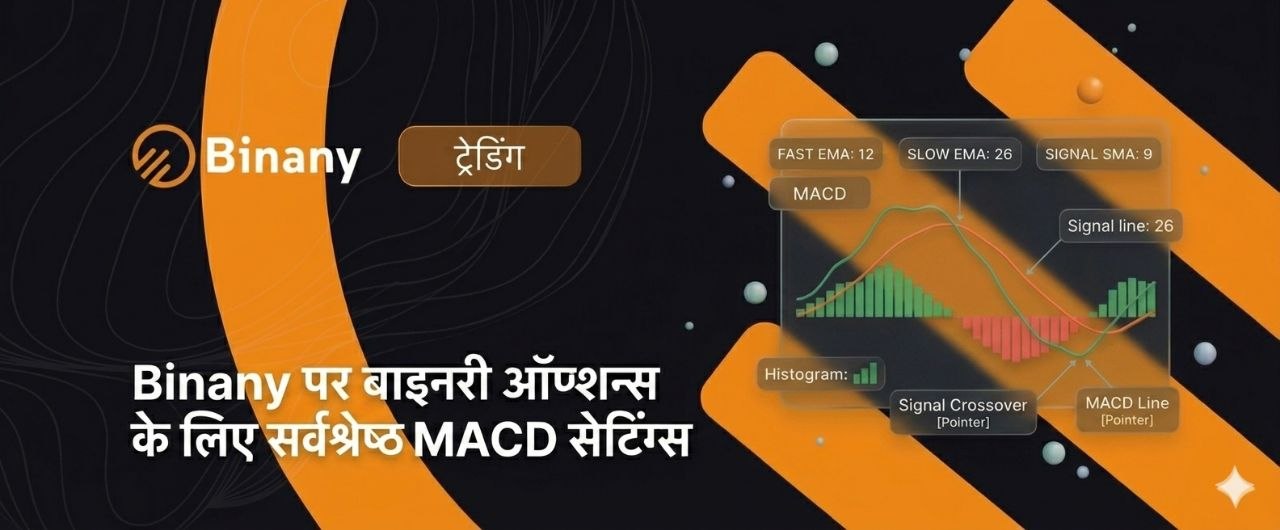
If you’ve added MACD to your Binany chart and aren’t sure whether the default numbers are right, here’s the short answer: 12, 26, 9 is the correct starting point for most traders on the 5-minute chart. That’s Fast EMA = 12, Slow EMA = 26, Signal period = 9. These are the best MACD settings for binary options as a baseline — and they’ve worked across markets for decades.
But knowing the right numbers is only half the picture. Understanding what each number controls is what allows you to make smart adjustments when your timeframe or strategy demands it. Smaller numbers make MACD faster and more sensitive — you get more signals, but also more noise. Larger numbers make MACD slower and smoother — fewer signals, but each one carries more weight. Neither approach is universally better.
This guide covers what each MACD setting does, which settings work best by timeframe and strategy, how to change MACD settings on Binany step by step, and the one mistake that destroys results when traders start adjusting the default numbers.
What Do the Three MACD Settings Actually Mean?
Every MACD indicator runs on three numbers. They control speed, sensitivity, and signal timing. Here’s what each one does:
| Setting | Name | Default value | What changing it does |
| First number | Fast EMA period | 12 | Shorter = more reactive to recent price. Longer = smoother, slower response. |
| Second number | Slow EMA period | 26 | The long-term baseline. Shorter = tighter MACD range. Longer = wider, slower swings. |
| Third number | Signal period | 9 | The smoothing period for the signal line. Shorter = faster crossovers. Longer = fewer crossovers. |
These are the MACD 12 26 9 settings you’ll see as the default on Binany and every other trading platform. The MACD default settings 12 26 9 have been the industry standard for over 40 years — not because they’re perfect, but because they work reliably across a wide range of markets and timeframes.
How the Three Numbers Interact
The gap between the first and second number determines how wide MACD oscillates. The standard gap is 14 (26 minus 12). Narrowing this gap — for example, switching from 12, 26 to 5, 13 — produces a tighter, faster indicator that reacts to price changes in fewer bars.
The third number controls signal line smoothness. A value of 9 is the universal standard. Lowering it to 5 or 3 creates a faster signal line that crosses MACD more often, which means more entry signals per session — and more false ones.
One rule is absolute: the first number (fast EMA period) must always be smaller than the second (slow EMA period). The signal period is independent and typically set between 3 and 9.
Why 12, 26, 9 Became the Standard
Gerald Appel developed MACD in the late 1970s and optimised the 12 26 9 values for daily stock market charts. What do MACD settings mean in practice? They define a balance between responsiveness and reliability that holds up across markets. The MACD fast EMA period binary options traders use should always be evaluated against their specific timeframe — 12 bars on a daily chart is very different from 12 bars on a 1-minute chart. That’s why adapting the default to short binary options timeframes is sometimes necessary.
Best MACD Settings by Timeframe
This is the core reference table for every binary options trader on Binany. The right MACD settings 1 minute chart binary options traders need are very different from what works on a 15-minute chart. Here’s the full breakdown:
| Timeframe | Recommended settings | Signal speed | Signal count | Best strategy |
| 1-minute chart | 5, 13, 3 or 3, 10, 3 | Very fast | Very high — many signals per session | Scalping; short 1–3 min expiry |
| 3-minute chart | 8, 21, 5 | Fast | High | Short trend following; 5–10 min expiry |
| 5-minute chart | 12, 26, 9 (default) | Balanced | Moderate — the most usable frequency | Standard crossover and divergence; 15–25 min expiry |
| 15-minute chart | 12, 26, 9 or 21, 55, 9 | Slower | Low — but highly reliable | Trend trading; 45–75 min expiry |
| Higher (1-hour+) | 21, 55, 9 | Slow | Very low | Context / trend direction only — not for entries |
1-Minute Chart Settings (Scalping)
The default 12, 26, 9 is too slow for 1-minute charts. By the time the crossover appears, 3–5 candles of the move have already passed. That’s a problem when your expiry window is only 1–3 minutes.
The recommended MACD settings for scalping binary options on a 1-minute chart are 5, 13, 3. The fast EMA reacts in 5 bars, the slow in 13 bars, and the signal line is almost immediate at 3. Crossovers align much better with short expiry windows. An even faster alternative is 3, 10, 3 — useful during high-volatility sessions but prone to significant noise in ranging markets.
The trade-off is real: fast MACD settings binary options traders use on 1-minute charts produce far more false signals. Every crossover must be confirmed by a candlestick pattern before you trade it. These settings are not recommended for beginners — get consistent results on the 5-minute chart first.
5-Minute Chart Settings (Standard)
The MACD settings 5 minute chart binary options traders should default to are 12, 26, 9. The default was historically tested on this frequency and produces a good balance of signal quantity and reliability — typically 5–10 crossover signals per session on EUR/USD.
If you find the default slightly slow during high-volatility periods, 8, 21, 5 is a moderate adjustment. It’s faster than the default without the extreme noise of scalping settings. Use it only after testing both settings on at least 50 demo trades each. Don’t switch based on one or two sessions.
MACD 12 26 9 binary options trading on the 5-minute chart is the right starting point for most Binany users. Stick with it until you have data showing a specific problem with the default.
15-Minute Chart Settings (Trend Trading)
For the MACD settings 15 minute chart binary options strategy, 12, 26, 9 works well. For traders who want even fewer, higher-confidence signals, 21, 55, 9 is the better choice. It produces very clean crossovers with minimal noise — but signals may appear only 3–5 times per session. Best for traders who prefer high conviction over trade frequency.
Never apply scalping settings (5, 13, 3) to a 15-minute chart. The resulting signal density makes consistent execution impossible. Slow MACD settings binary options traders use on longer timeframes filter out the noise that kills short-term trades on faster settings.
Best MACD Settings by Strategy and Market Condition
Your timeframe isn’t the only factor. Market conditions and strategy type both affect which MACD settings binary options traders should use.
| Use case | Recommended settings | Reasoning |
| Standard crossover strategy | 12, 26, 9 | Universal default — balanced signal frequency and reliability |
| Divergence detection | 12, 26, 9 or 21, 55, 9 | Slower settings make divergence patterns cleaner and easier to identify |
| Scalping (1-min chart) | 5, 13, 3 or 3, 10, 3 | Must react within 3–5 bars to match short expiry windows |
| Trending market (strong ADX) | 21, 55, 9 | MACD settings for trend trading binary options — slower settings filter pullback noise in strong trends |
| Ranging / sideways market | Avoid MACD signals entirely | MACD whipsaws in ranging conditions — no setting fixes this |
| High volatility (BTC, GBP/JPY) | 12, 26, 9 with strict confirmation | Smaller settings amplify volatility noise; stick to default + confirmation |
| OTC market Binany | 12, 26, 9 | OTC algorithm produces clean medium-speed movements — default works well |
The Ranging Market Rule
No MACD setting works reliably in a sideways market. MACD settings for ranging market binary options conditions don’t exist — the indicator was designed for trending price action. Switching from 12, 26, 9 to 5, 13, 3 in a ranging market doesn’t fix the problem. It just produces more false signals at a faster rate.
Before selecting any settings, check market conditions. If ADX is below 20, wait for a trend to develop. MACD settings for volatile assets binary options traders can adapt, but ranging markets are a fundamentally different problem — one that requires patience rather than a different set of numbers.
Best MACD Settings by Asset on Binany
Different assets have different volatility profiles. Here’s how to match MACD settings gold binary options, crypto, forex, and other assets on Binany:
| Asset | Recommended settings | Timeframe | Notes |
| EUR/USD | 12, 26, 9 | 5-min, 15-min | Most liquid — default works perfectly; low noise |
| GBP/USD | 12, 26, 9 | 5-min | Slightly more volatile — default appropriate with candlestick confirmation |
| Gold (XAU/USD) | 12, 26, 9 or 21, 55, 9 | 5-min, 15-min | Clean trend structure — MACD settings gold binary options Binany traders prefer slower settings for trend entries |
| BTC/USD | 12, 26, 9 minimum | 15-min preferred | MACD settings crypto binary options: high volatility — never use fast settings; default only on 15-min+ |
| EUR/USD OTC | 12, 26, 9 | 5-min | OTC algorithm is predictable — default with standard confirmation |
| Indices (S&P 500) | 12, 26, 9 | 5-min during US session | Active session only; default gives clear directional signals |
The MACD settings forex binary options traders rely on most are the same as everywhere else: 12, 26, 9 on the 5-minute chart for major pairs like MACD settings EUR/USD Binany. The key principle is consistent: use 12, 26, 9 as your baseline on all assets. Adjust slower (21, 55, 9) when you want higher-conviction, fewer signals on trending assets. Adjust faster (8, 21, 5) only on 1–3 minute charts after demo testing. Never use fast settings on high-volatility assets like BTC/USD or GBP/JPY during news events.
How to Change MACD Settings on Binany
Changing your MACD settings on Binany takes about 30 seconds. Here’s how to do it step by step.
Step-by-Step Setup
- Open the Binany chart. Select your asset and set your desired timeframe (for example, 5-minute).
- Click the Indicators button in the chart toolbar — usually shown as an overlapping-lines icon or a formula symbol.
- Search for MACD in the indicator search field and click to add it to the chart.
- The MACD panel opens below the price chart. Click the gear (settings) icon on the MACD panel to open the parameter panel.
- You’ll see three input fields: Fast EMA (default: 12), Slow EMA (default: 26), Signal (default: 9).
- Enter your chosen values. For the standard setup: Fast = 12, Slow = 26, Signal = 9. For a faster scalping setup on 1-minute charts: Fast = 5, Slow = 13, Signal = 3.
- Click Apply or Confirm. The MACD panel updates immediately to reflect the new settings.
- Test any new settings on the Binany demo account for at least 30 trades before applying them to a live account.
[Image: Binany MACD settings panel showing Fast EMA (12), Slow EMA (26), Signal (9) input fields — standard default configuration]
That’s the full MACD indicator settings Binany tutorial. How to set up MACD on Binany is straightforward — the decisions you make about which values to enter are the part that requires thought.
The Biggest Mistake When Changing MACD Settings
Most traders who change their MACD settings make the same error. It’s not that they choose the wrong numbers — it’s how they choose them.
Overfitting: Optimising for the Past
The most dangerous MACD overfitting settings binary options mistake: scrolling back through historical charts, testing different settings until you find the ones that would have produced perfect buy and sell signals in the past.
This is overfitting. The settings are now tuned to one specific historical period, not to the market’s actual behavior. They will fail as soon as conditions change — and in binary options, conditions change constantly. If your custom settings produce a 90%+ win rate on backtested charts, they are almost certainly overfitted. Real MACD settings produce 55–70% win rates with confirmation, not 90%.
[Image: Side-by-side MACD comparison on Binany 5-minute EUR/USD chart: 12, 26, 9 (left panel) vs 5, 13, 3 (right panel) showing difference in crossover frequency]
The Safe Approach to Changing Settings
Should I change MACD default settings? Only when you have data showing a specific problem with 12, 26, 9 — not because you read that different settings are better somewhere online.
Start with 12, 26, 9. Test on 50+ trades on the Binany demo account. Log results in a trading journal. If results are unsatisfactory, identify the specific problem first: too many signals means your settings are too fast or the market is ranging; entries arriving too late means your settings are too slow for your timeframe.
Change one setting at a time. Re-test 50+ trades after each change. Never change multiple values simultaneously — you won’t know which change affected your results. Only apply new settings to a live account after achieving consistent demo results that exceed the break-even win rate for your payout level.
Quick Reference: When to Consider Changing Settings
| Problem observed | Likely cause | Suggested adjustment |
| Entries consistently 3–5 candles late | Settings too slow for the timeframe | Reduce fast period by 3–4 (e.g. 12→8) |
| Too many false crossovers per session | Settings too fast; market ranging | Increase periods OR switch to 15-min chart |
| Divergence patterns hard to read | Too much noise in histogram | Increase slow period (26→34) for cleaner bars |
| Signals fine but expiry often expires early | Expiry time mismatch | Adjust expiry, not settings |
Conclusion
The best MACD settings for binary options on Binany are not a secret formula — they’re a framework. Start with 12, 26, 9 on the 5-minute chart. It’s not a compromise setting; it’s the proven baseline that has worked across markets for decades.
The timeframe hierarchy is simple: use faster settings (5, 13, 3) for 1-minute scalping, the default (12, 26, 9) for 5-minute standard trading, and slower settings (21, 55, 9) for 15-minute trend entries. The best MACD settings Binany traders use long-term aren’t necessarily the fastest or the most optimised — they’re the ones tested forward on demo, not backward on history.
Remember the ranging market rule: no MACD settings binary options combination works in sideways markets. When ADX is below 20, the answer isn’t different settings — it’s to wait for a trend.
And remember the overfitting warning: do not optimise settings based on how they look on past charts. Test any change forward on demo.
Open the Binany demo, add MACD with default 12, 26, 9 settings, and test it on at least 30 trades on a 5-minute EUR/USD chart before considering any adjustments. That’s where the best MACD settings binary options strategy starts.
FAQ
Q1. What are the best MACD settings for binary options on Binany?
The best starting settings are 12, 26, 9 — the industry default. This means Fast EMA = 12, Slow EMA = 26, Signal period = 9. These work reliably on the 5-minute chart for standard crossover and divergence strategies. For 1-minute chart scalping, faster settings of 5, 13, 3 produce more timely signals. For 15-minute trend trading, 21, 55, 9 gives fewer but more reliable crossovers. There is no universally best setting — the right choice depends on your chart timeframe and strategy type. Always test any setting on the Binany demo account before applying it to a live trade.
Q2. What do the three MACD numbers mean?
The three numbers control how MACD is calculated. The first number is the fast EMA period — smaller values make the indicator react faster to price changes. The second is the slow EMA period — the longer baseline the fast EMA is compared against. The third is the signal line period — a moving average of the MACD line that creates crossover signals. The default 12, 26, 9 means: compare a 12-period EMA to a 26-period EMA, then smooth the result with a 9-period signal line. The gap between the first two numbers controls how sensitive the indicator is; the third number controls how often crossovers appear.
Q3. Should I change the default MACD settings on Binany?
Not initially. The default 12, 26, 9 is the proven starting point and works reliably on the 5-minute chart. Only consider changing settings after you’ve tested at least 50 trades with the default and identified a specific problem — entries arriving too late, too many false signals, or signals misaligned with your expiry time. Change one value at a time and re-test on demo before applying to a live account. Changing settings without data to justify it is guesswork, not optimization. Most beginners who switch settings early do so based on one or two bad sessions, not on a meaningful sample of results.
Q4. What MACD settings work best on the 1-minute chart for binary options?
The default 12, 26, 9 is too slow for 1-minute charts — crossovers arrive 3–5 candles after the move starts. Recommended settings for 1-minute scalping are 5, 13, 3 or 3, 10, 3. These react within 3–5 bars, aligning better with 1–3 minute expiry windows. The trade-off is significantly more false signals, so every crossover must be confirmed by a candlestick pattern before you trade it. These settings are not recommended for beginners — use default settings until you’re consistently profitable on 5-minute charts first. Starting with scalping settings before mastering the default is one of the most common mistakes on Binany.
Q5. What MACD settings are best for the 5-minute chart on Binany?
12, 26, 9 is the correct setting for the 5-minute chart. It produces a manageable number of crossover signals — typically 5–10 per session on EUR/USD — and gives enough time for divergence patterns to form clearly. If you find the default slightly slow during high-volatility periods, 8, 21, 5 is a moderate adjustment that produces more signals without the extreme noise of scalping settings. Only switch to 8, 21, 5 after testing both settings on at least 50 demo trades each. The 5-minute chart is where most Binany traders should spend their first months of live trading — the signal quality at 12, 26, 9 is hard to improve on at this timeframe.
Q6. Do MACD settings need to change for different assets on Binany?
For most assets — EUR/USD, GBP/USD, Gold, and indices — 12, 26, 9 on the 5-minute chart works reliably. High-volatility assets like BTC/USD should only be traded with the default settings or slower (21, 55, 9) on 15-minute charts or above. Never use fast scalping settings (5, 13, 3) on crypto assets — the volatility amplifies noise to an unmanageable level. For OTC market assets on Binany, 12, 26, 9 works well because the OTC algorithm produces consistent, medium-speed price movements. Asset-specific adjustments are rarely necessary if your timeframe choice is correct.
Q7. How do I change MACD settings on Binany?
Click the Indicators button on the Binany chart toolbar. Search for MACD and add it to the chart. Click the gear (settings) icon on the MACD panel. Three input fields appear: Fast EMA, Slow EMA, and Signal. Enter your chosen values — for the default setup: 12, 26, 9. For 1-minute scalping: 5, 13, 3. Click Apply. The chart updates immediately. Always test any new settings on the Binany demo account for at least 30 trades before applying to a live account. The process takes under a minute — the testing period afterward is what determines whether the settings are actually right for your trading style.
Q8. What is overfitting and why is it dangerous when changing MACD settings?
Overfitting is when you adjust MACD settings to match past chart data so precisely that they produce near-perfect historical results — but fail on new price data. It happens when traders scroll back through charts, try different settings until one looks great historically, then apply it live. Those settings are tuned to one specific past period, not to general market behavior. Warning sign: if custom settings show a 90%+ win rate on backtested charts, they are almost certainly overfitted. Real MACD settings produce 55–70% win rates with confirmation. Always test settings forward on the Binany demo, not backward on historical charts.

Financial writer and market analyst with a passion for simplifying complex trading concepts. He specializes in creating educational content that empowers readers to make informed investment decisions.